
Interference Check for efficient coordination and flawless BIM models
Want to avoid clashes in your project?
Interference Check is a powerful Revit tool that helps detect element intersections, reducing errors and simplifying coordination.
How to Use Interference Check?
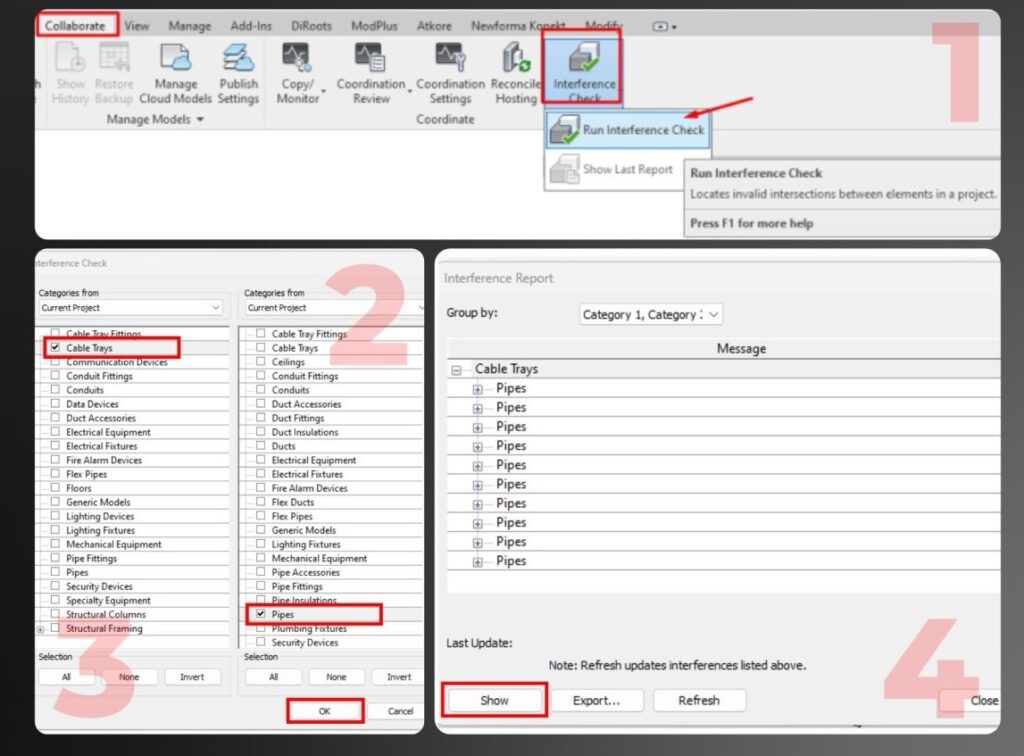
- Go to Collaborate → Interference Check → Run Interference Check
- Select two element categories, such as trays and pipes for example
- Run the analysis to see a list of detected clashes
- Review the clashes using Show, then make necessary adjustments
Advantages of Interference Check:
- Early detection of errors → reduces rework and costs
- Space optimization → helps properly place elements
- Automation → speeds up the checking process
- Improved safety → prevents potential failures
Disadvantages:
- False positives → requires manual analysis
- High system load → complex projects require powerful resources
- Dependence on model accuracy → errors in data lead to incorrect results